

What’s Similarweb: The Full Information | JP
today’s digital landscape, understanding your website’s performance and staying ahead of competitors is crucial.
One tool that has emerged as a leader in providing comprehensive web analytics and market intelligence is Similarweb. But what exactly is Similarweb, and how can it benefit your business? In this article, we’ll explore the ins and outs of Similarweb, delve into its array of tools, discuss who can benefit from its features, and provide an overview of its pricing plans.
What is Similarweb?
Similarweb is a digital intelligence platform that offers insights into website traffic, performance metrics, and market trends. By analyzing data from various sources, Similarweb provides you with a comprehensive view of your online presence and that of your competitors. This information is invaluable for making informed decisions, optimizing marketing strategies, and identifying growth opportunities.
Similarweb tools
Similarweb offers a suite of tools designed to provide in-depth analysis and insights across various digital channels:
1. Web Intelligence
Analyzing website performance and competitive benchmarks is key to staying ahead in the digital landscape. The Web Intelligence suite offers insights into traffic sources, audience demographics, engagement metrics, and search visibility, enabling you to spot market trends and make data-driven decisions.
a. Website Analysis
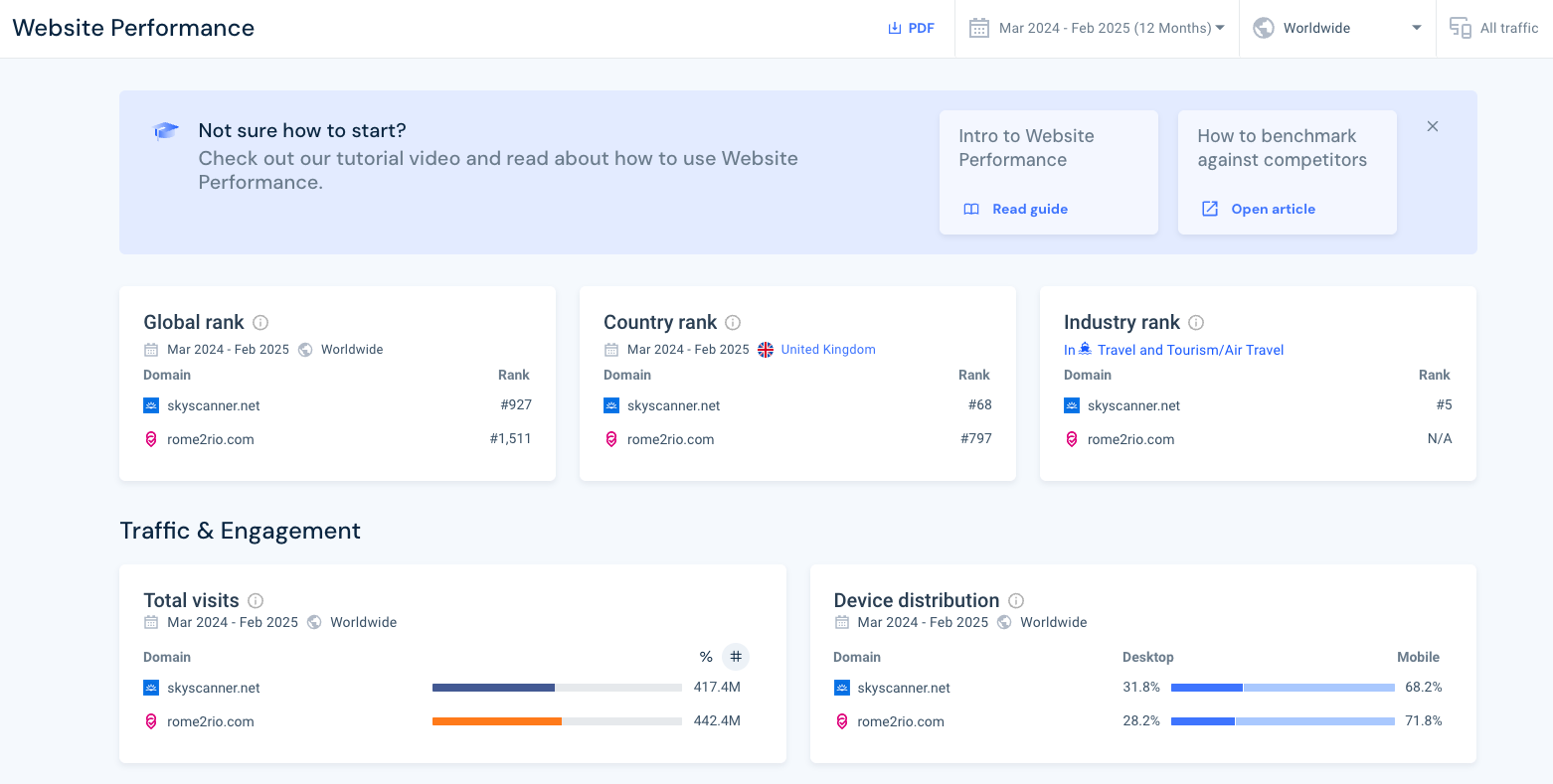
Website Analysis provides a comprehensive overview of a website’s performance, allowing you to assess your business’s digital presence and benchmark against competitors. It delivers key insights into traffic, audience demographics, search visibility, display advertising, and more, helping marketers and analysts make data-driven decisions to improve online strategies.
- Traffic: Traffic insights reveal how visitors arrive at a website, tracking sources such as direct visits, referrals, organic and paid search, social media, and display ads. Additionally, users can analyze total visits, bounce rates, pages per session, and average visit duration to measure engagement and identify opportunities for improvement.
- Audience: Understanding audience demographics and behavior is key to refining digital strategies. This section includes data on age, gender, geographic location, and interests, helping you tailor your content and marketing efforts.
- Search: Search performance plays a crucial role in a website’s visibility. Similarweb highlights organic and paid search traffic, showing which keywords drive visitors.
- Display: The Display section analyzes display advertising, showing which networks, publishers, and creatives drive the most traffic. Marketers can also optimize their display campaigns by seeing competitor ad creatives.
There are more web analysis features, but I just covered the main ones.
b. Web Category Analysis
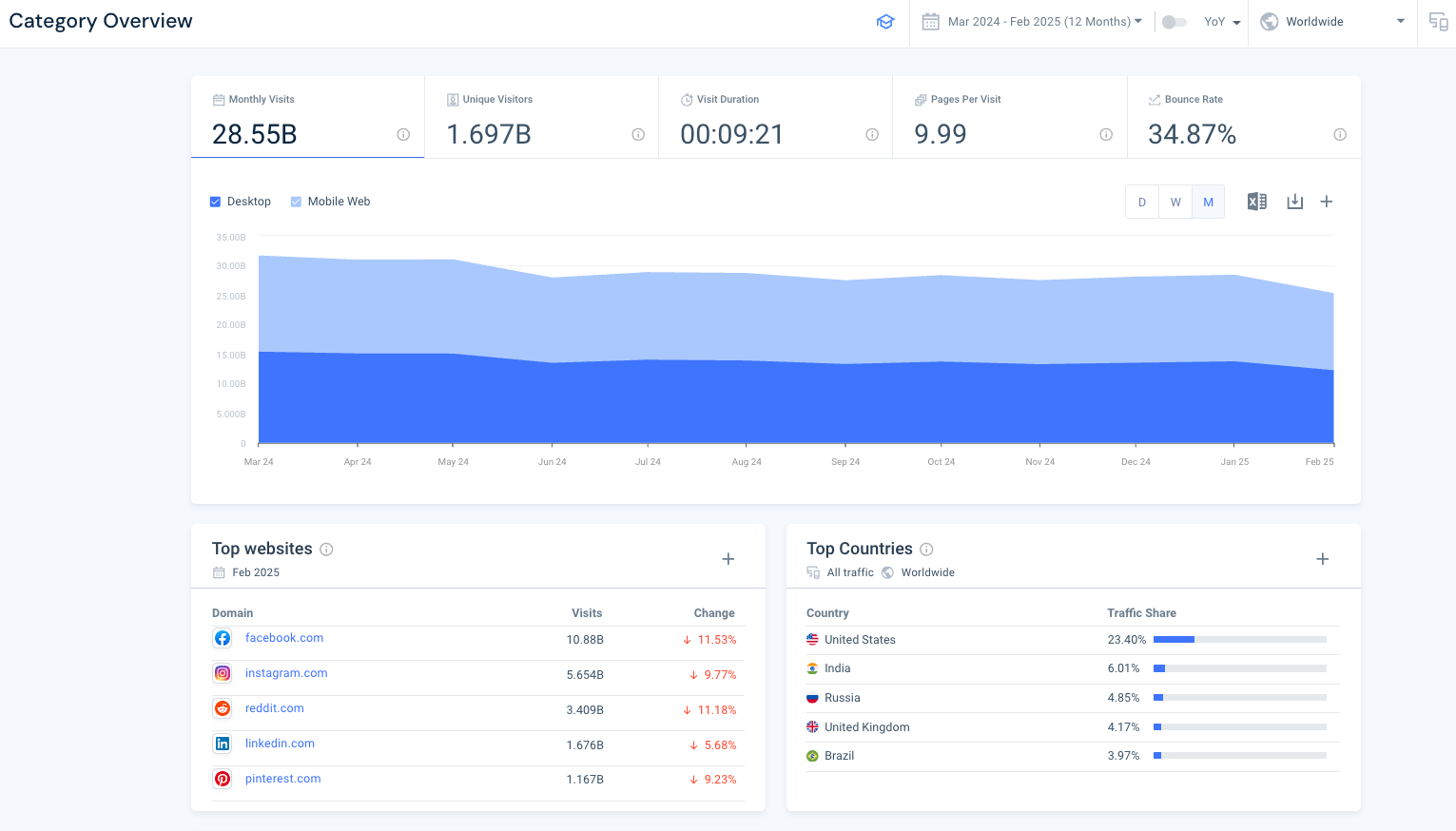
Similarweb’s Web Category Analysis allows you to analyze how websites perform within specific industries and niches. By analyzing trends, top websites, and audience behavior at a category level, users can benchmark performance, identify growth opportunities, and refine their digital strategies. This feature helps marketers, analysts, and business owners understand market dynamics and adjust their positioning accordingly.
c. Website Segments
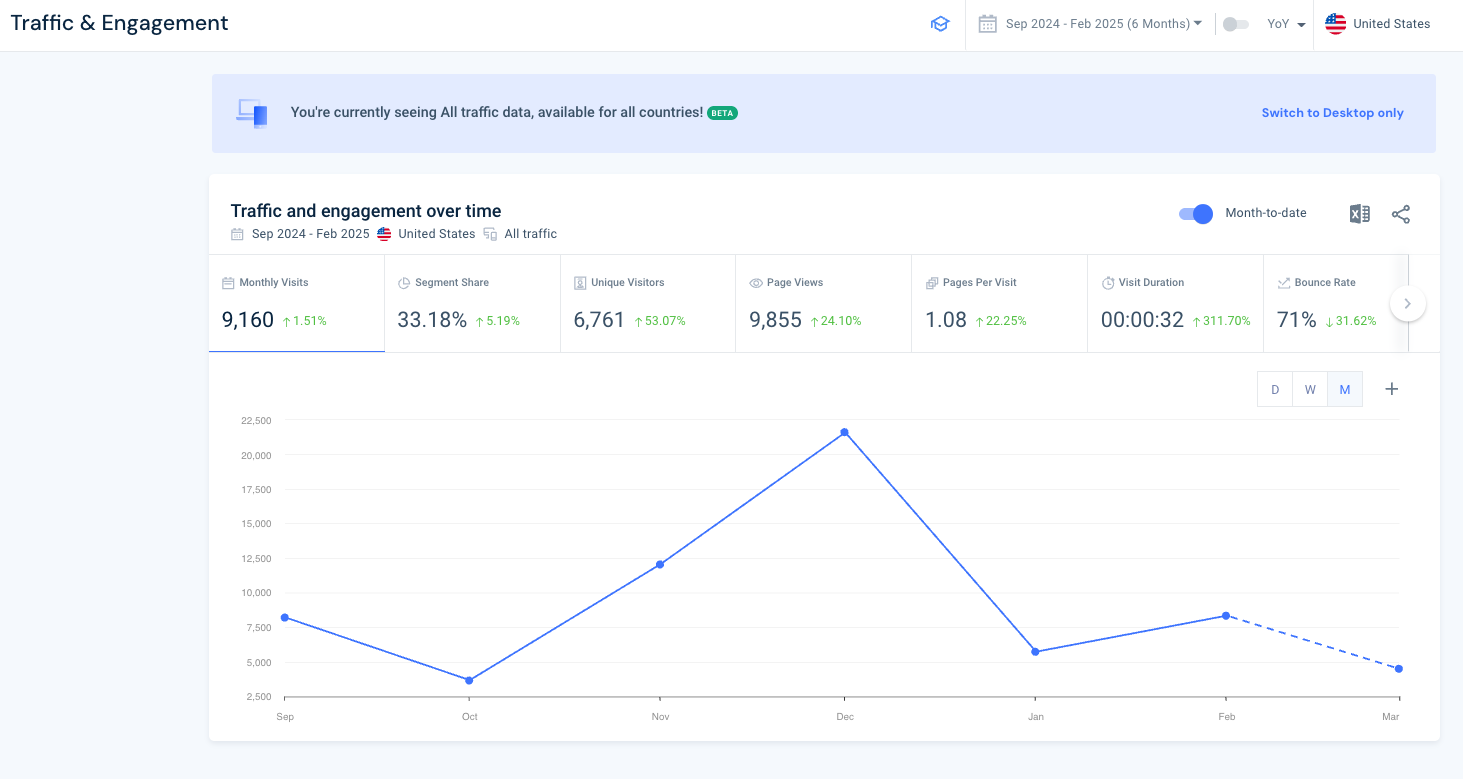
The Website Segments feature allows you to analyze specific sections or product categories of a website, rather than viewing overall site performance. This granular approach is particularly useful when you are analyzing a single product on a website that has multiple sections.
d. Market Analysis
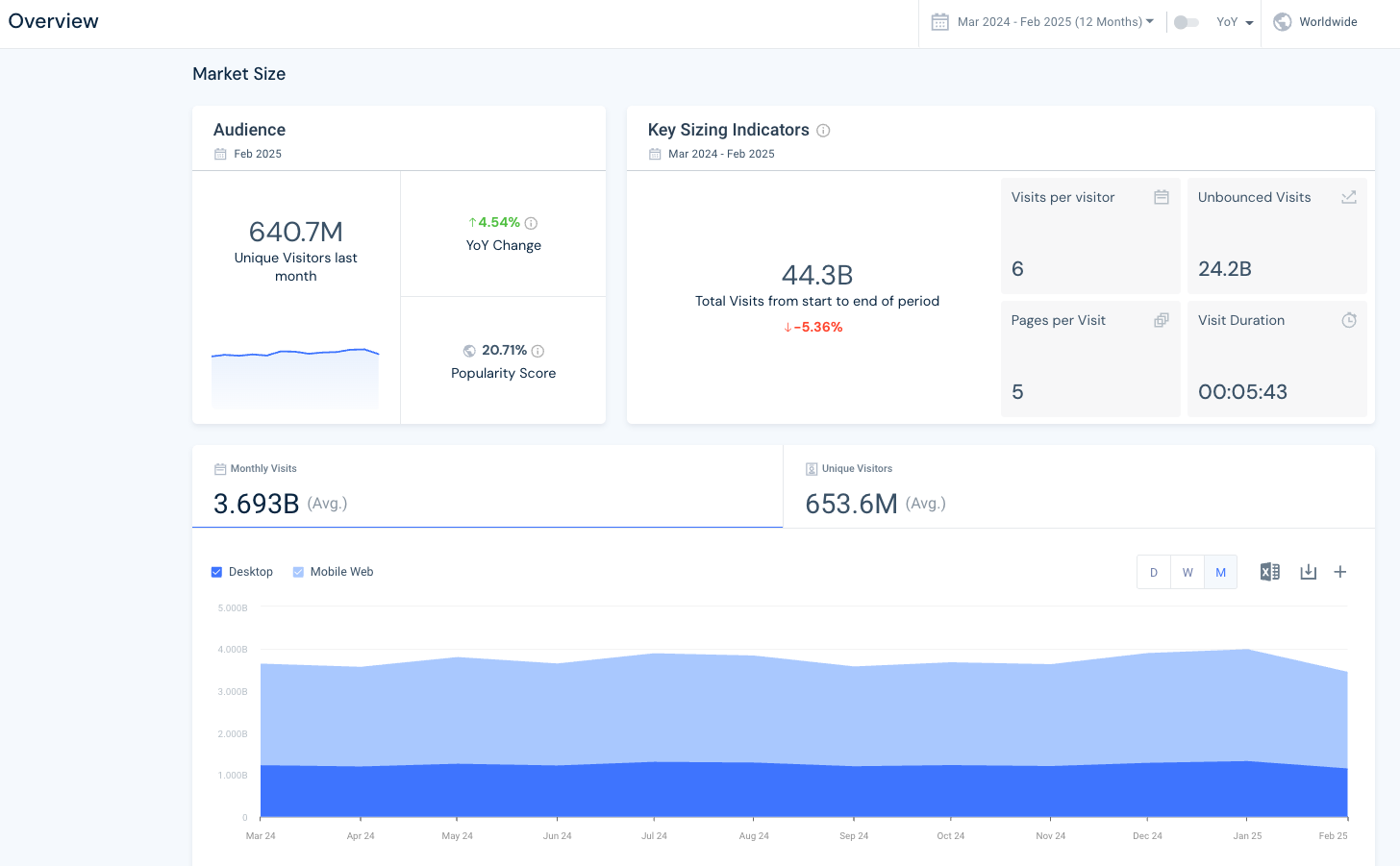
Market Analysis provides you with a comprehensive view of your industry landscape, helping you understand market dynamics, competitor positioning, and emerging trends. By analyzing segmentation, key players, geographic performance, demand trends, and audience demographics, you can refine your business strategies and make informed decisions to stay competitive.
- Segmentation: Breaking an industry into specific subcategories allows you to identify niche markets and growth opportunities. The Segmentation feature enables users to analyze market segments based on traffic patterns, audience behavior, and competitor activity, helping them refine their marketing and product strategies for different customer groups.
- Players report: Identifying key competitors is essential for market positioning. The Players report ranks businesses based on audience growth, brand strength, cost efficiency, and loyalty and retention, allowing companies to benchmark their performance, uncover competitive advantages, and spot gaps in their strategy.
- Geography: The Geography section provides insights into how different regions contribute to overall market performance. This feature lets you see traffic share per country, broken down into visits, average visit duration, pages per visit, and more.
- Demand Trends: With Demand Trends, you can track top keyword queries by market. Users gain insights into search volume, ranking shifts, yearly trends, and the top traffic-driving site for each keyword. Since search volume reflects user interest, it serves as a strong proxy for market demand.
- Demographics: Demographic insights provide a deeper understanding of consumer behavior. The Demographics section analyzes age distribution and gender. You can also see the age distribution of the top sites in the market.
e. Demand Analysis
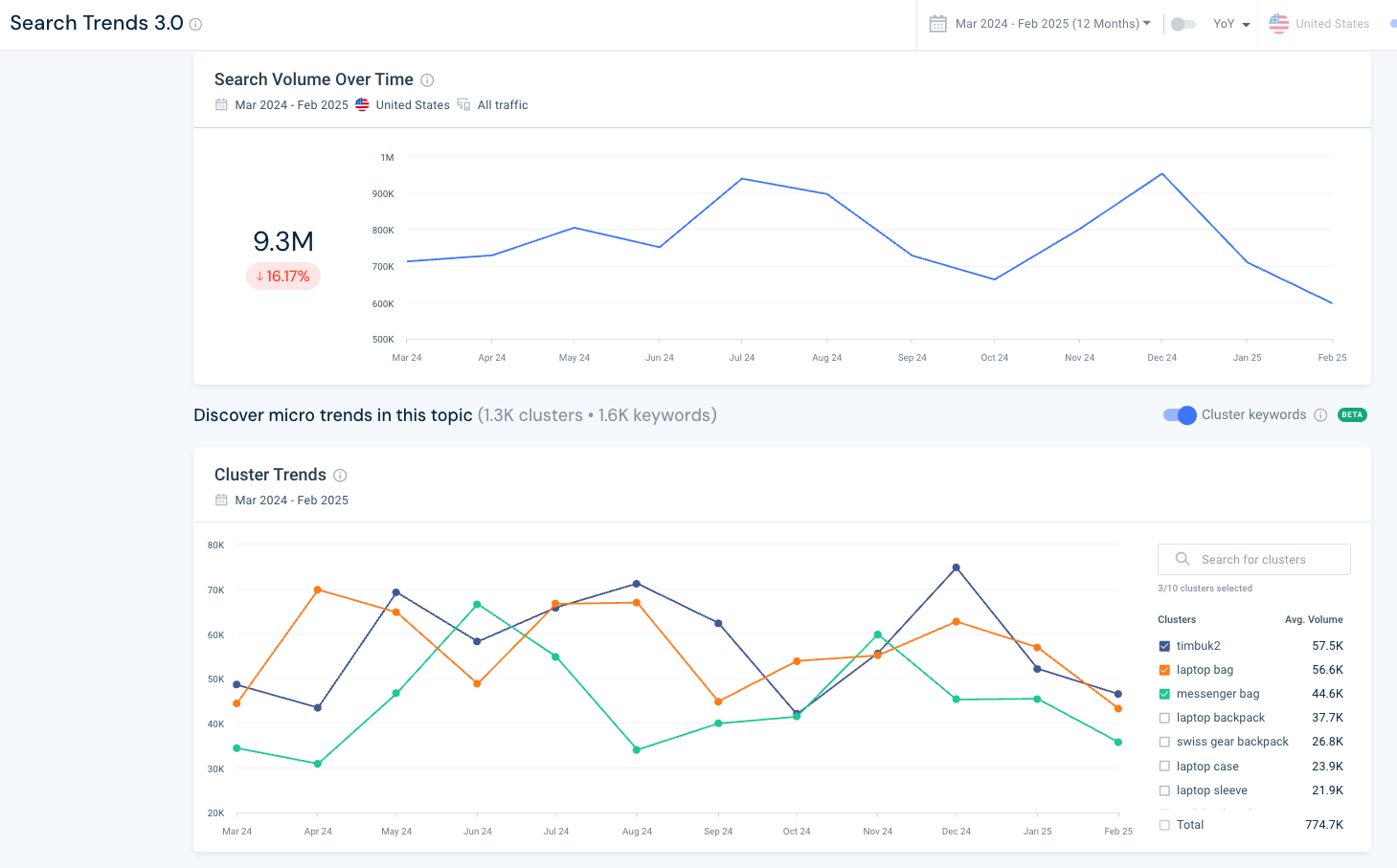
Similarweb’s Demand Analysis helps you understand market demand by analyzing a keyword group. The tool also shows you the trends by country and presents individual keyword clusters showing their search volume, search market share, and volume changes.
f. Conversion Analysis
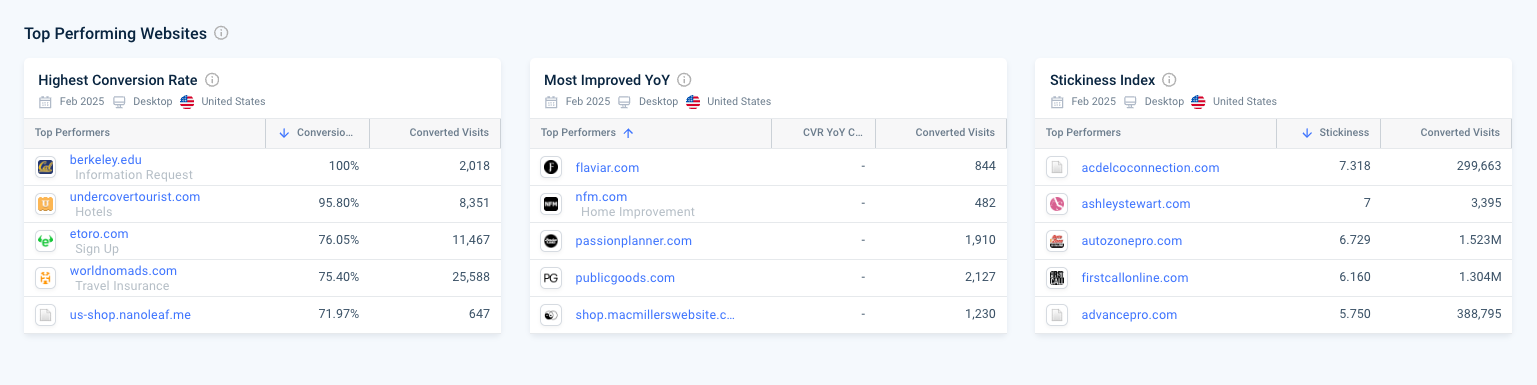
The Conversion Analysis report enables users to cluster together groups of competing websites and shows bottom-of-the-funnel metrics like conversion rates and converted visits. You can also filter the results based on market and country.
2. Search Intelligence
Gaining deep insights into search engine performance is essential for optimizing SEO and PPC strategies. The Search Intelligence suite provides tools for keyword research, SERP analysis, rank tracking, and backlink analytics, enabling you to uncover high-performing keywords, analyze search trends, and monitor competitor search visibility.
With features like Keyword Generator, Rank Tracker, and Site Audit, you can optimize your content strategy, improve rankings, and drive more targeted traffic to your website. By leveraging these tools, you can stay ahead of search algorithm updates and maintain a strong online presence in an increasingly competitive digital landscape. Let’s check each of them:
a. Keyword Research
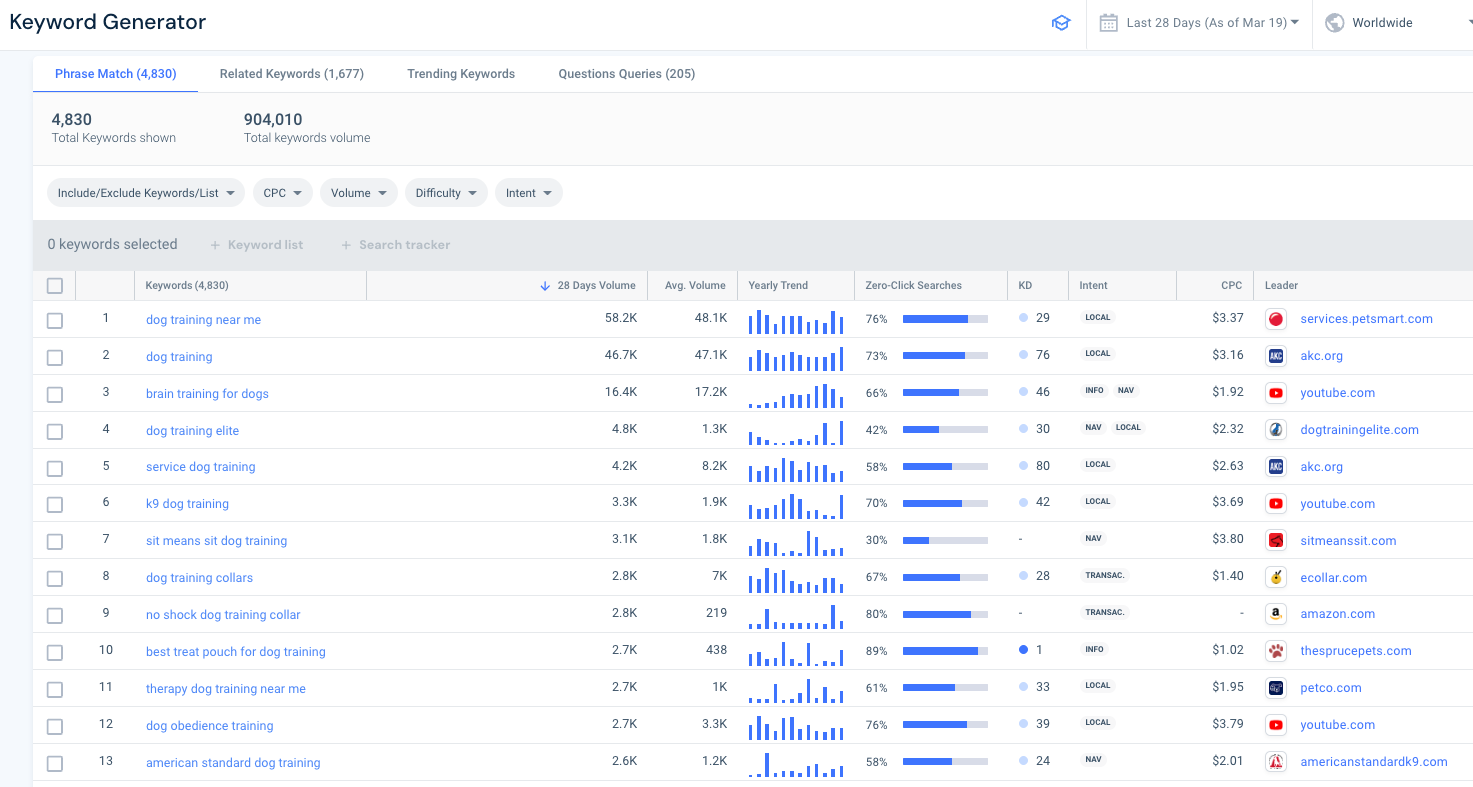
The Keyword Research tool provides you with data-driven insights into search trends, competitor keyword strategies, and high-performing search terms. By analyzing search volume, keyword difficulty, and traffic potential, you can drive more targeted traffic and improve search visibility.
- Keyword generator: Finding new keyword opportunities is crucial for a successful search strategy. The Keyword Generator helps you uncover high-potential keywords based on search intent and industry trends. By analyzing search volume, competition levels, and keyword variations, you can identify long-tail keywords, trending search terms, and untapped opportunities for organic and paid search campaigns.
- Search ads: The Search Ads Spy feature provides insights into which keywords competitors are bidding on in paid search campaigns. You can analyze text ads, see ad copy, clicks, traffic changes, and landing pages. You can also see shopping ads breakdowns showing clicks, ads, and landing pages.
- SERP snapshot: The SERP Snapshot gives you a real-time view of search engine results pages (SERPs) for specific keywords. This includes a list of text results and SERP features.
- Website Explorer: Analyzing competitor keyword performance can highlight valuable opportunities. The Website Explorer Keywords report uncovers which keywords drive traffic to specific websites, helping you identify content gaps, target high-traffic search terms, and refine your SEO strategy to gain a competitive edge.
b. Rank Tracker
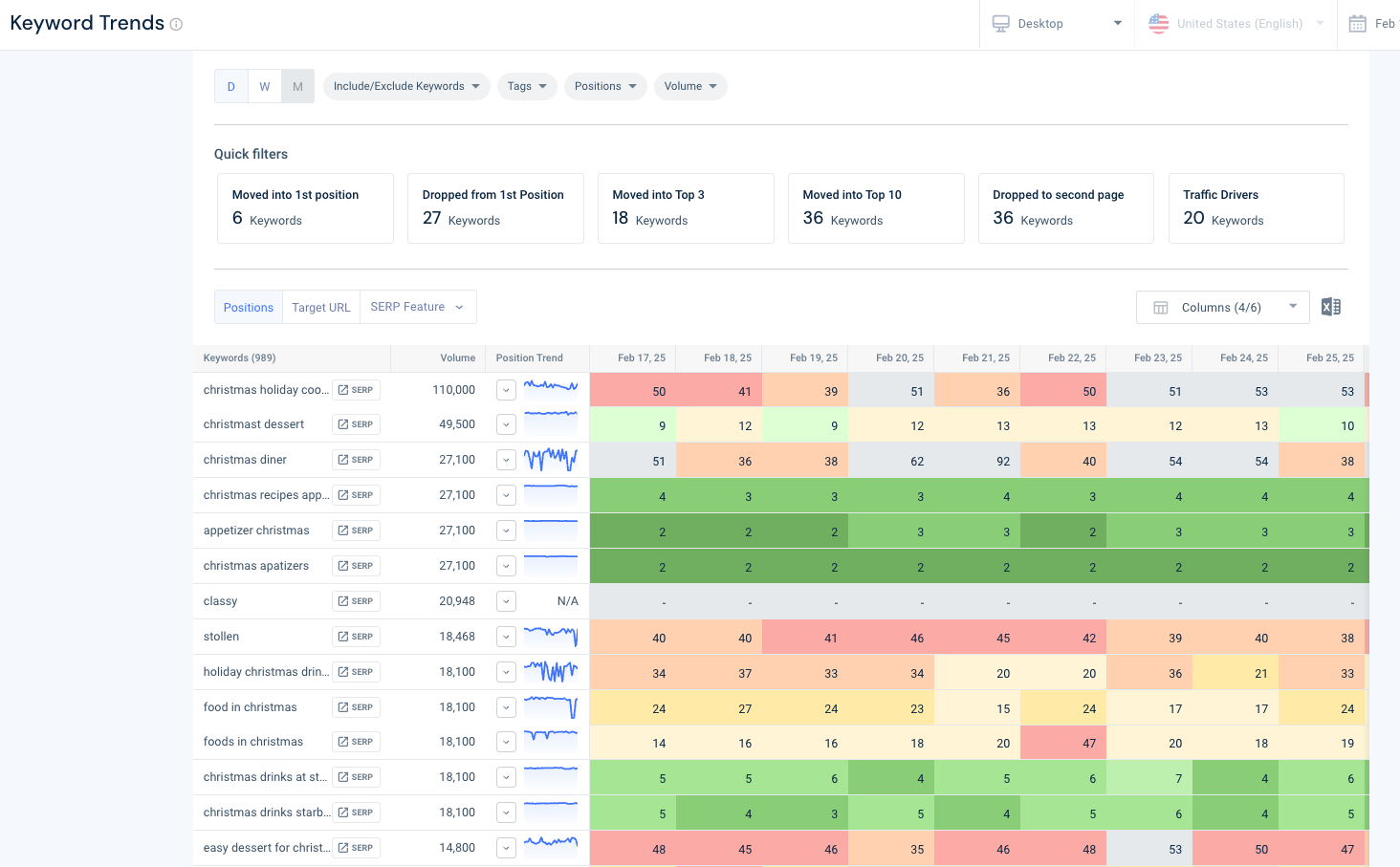
Tracking keyword rankings over time is crucial for assessing SEO performance and refining digital strategies. The Rank Tracker tool enables you to monitor keyword rankings, competitor positioning, and search visibility trends, helping you identify opportunities to enhance your search presence and stay ahead of the competition.
Here are a few key reports to look at:
- Overview: Get a high-level snapshot of your site’s rankings. This report shows the ranking distribution across all your pages and tracks performance over time using metrics like share of voice, SERP visibility, weighted average position, and clicks.
- Keywords: View all your tracked keywords along with their organic position, universal position, and click data. You’ll also see which URLs are ranking for which keywords.
- Keyword Trends: Track how your keyword rankings evolve over time. Use filters for keyword, tag, position, and volume to analyze specific terms or areas of your site.
- Tags: Segment your keyword tracking by topic and subtopic. Tags let you isolate and monitor performance by topic, and can be used as filters in other reports for deeper analysis.
- Pages: See which keywords each page ranks for, which SERP features they appear in, and get insight into the search intent behind their top-performing keywords.
- Competitors: Understand who your organic competitors are and how their keyword rankings change over time. You’ll see shared keywords and get a clear view of where you’re competing in search.
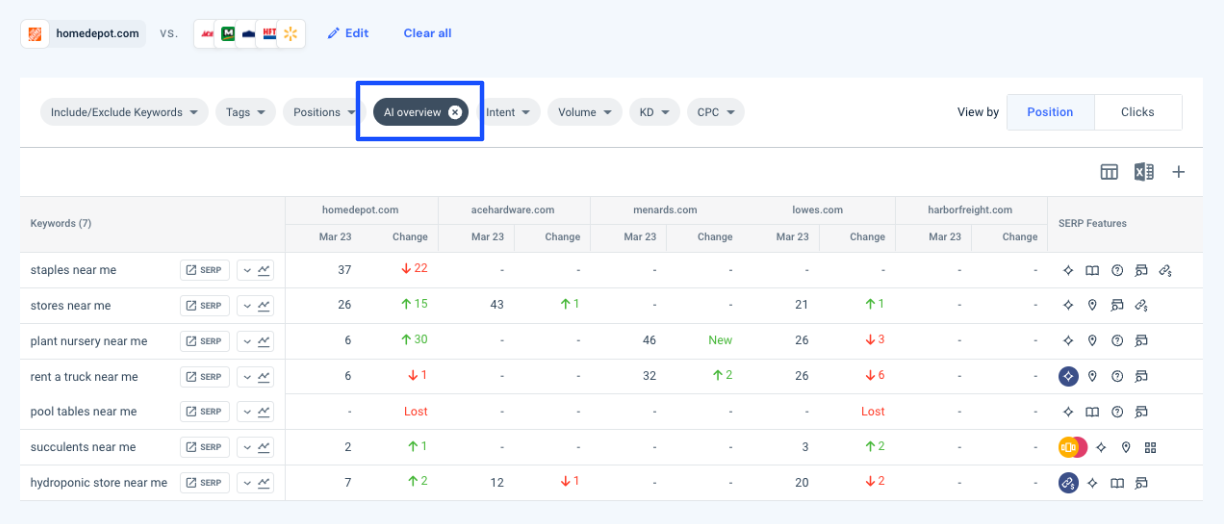
- SERP Features: Identify opportunities to win SERP features. This report provides an overview of your feature rankings and a detailed breakdown by an extensive list of SERP features, including AI Overviews. The report shows which appear on your tracked keywords, which you currently own, and which are up for grabs.
P.S. You can see which of your and your competitor’s keywords trigger AI Overviews, find the gaps, and reveal opportunities for AIOs on your keywords, all in a single report. To learn more, read Similarweb’s guide on competitive AI analysis.
c. Site Audit tool
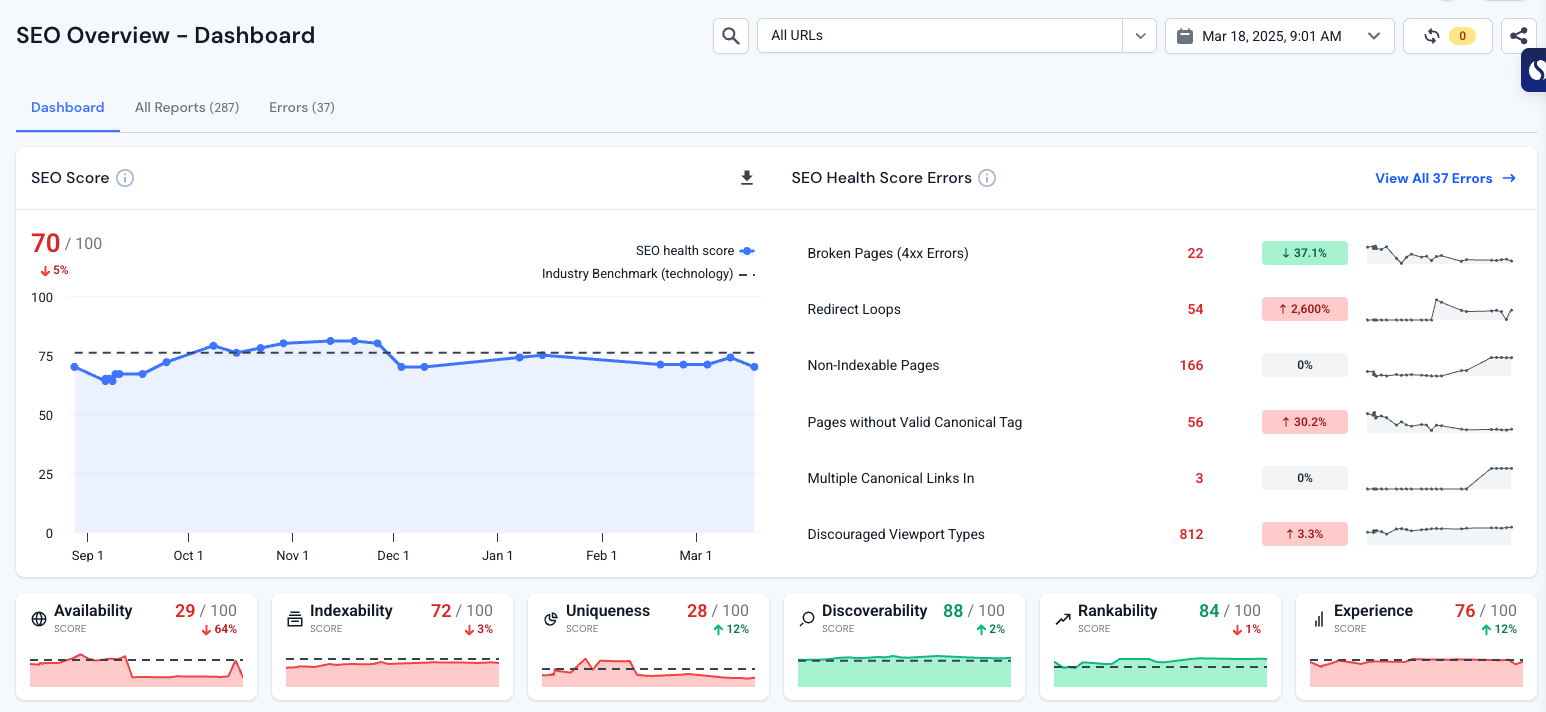
The Site Audit tool helps you identify technical & content SEO issues, site performance problems, and optimization opportunities that impact search rankings. By conducting a comprehensive website crawl, this tool provides actionable insights to improve a site’s crawlability, indexability, and overall SEO health.
The Site Audit report is highly detailed, but it’s broken down into manageable sections, including:
- Overview: Get a high-level snapshot of your technical SEO with an overall score out of 100. You can track how your site’s technical health has changed over time and drill down into specific components of the score such as availability, indexability, uniqueness, discoverability, rankability, and experience.
- Availability: Quickly identify which pages can’t be crawled by reviewing HTTP status code reports. This section highlights unauthorized pages, broken pages, failed URLs, and other errors affecting crawlability.
- Indexability: Pages that aren’t indexed won’t appear in search results. This report helps you identify indexability issues and review pages you’ve intentionally excluded from Google’s index.
- Uniqueness: Spot and resolve duplication issues across your site. This includes duplicate pages, titles, body content, and other elements that can dilute SEO performance.
- Discoverability: See how bots navigate your site. This section provides insights into crawl budget, internal linking structure, redirect chains, sitemap issues, and localization signals.
- Rankability: Understand how well your pages are positioned to rank. This report combines data from your content, structured data, page elements, Search Console, and more to assess your ranking potential.
- Experience: Evaluate your site’s user experience by analyzing page speed, engagement metrics, UX elements, security protocols, and external linking practices.
d. Backlink Analytics
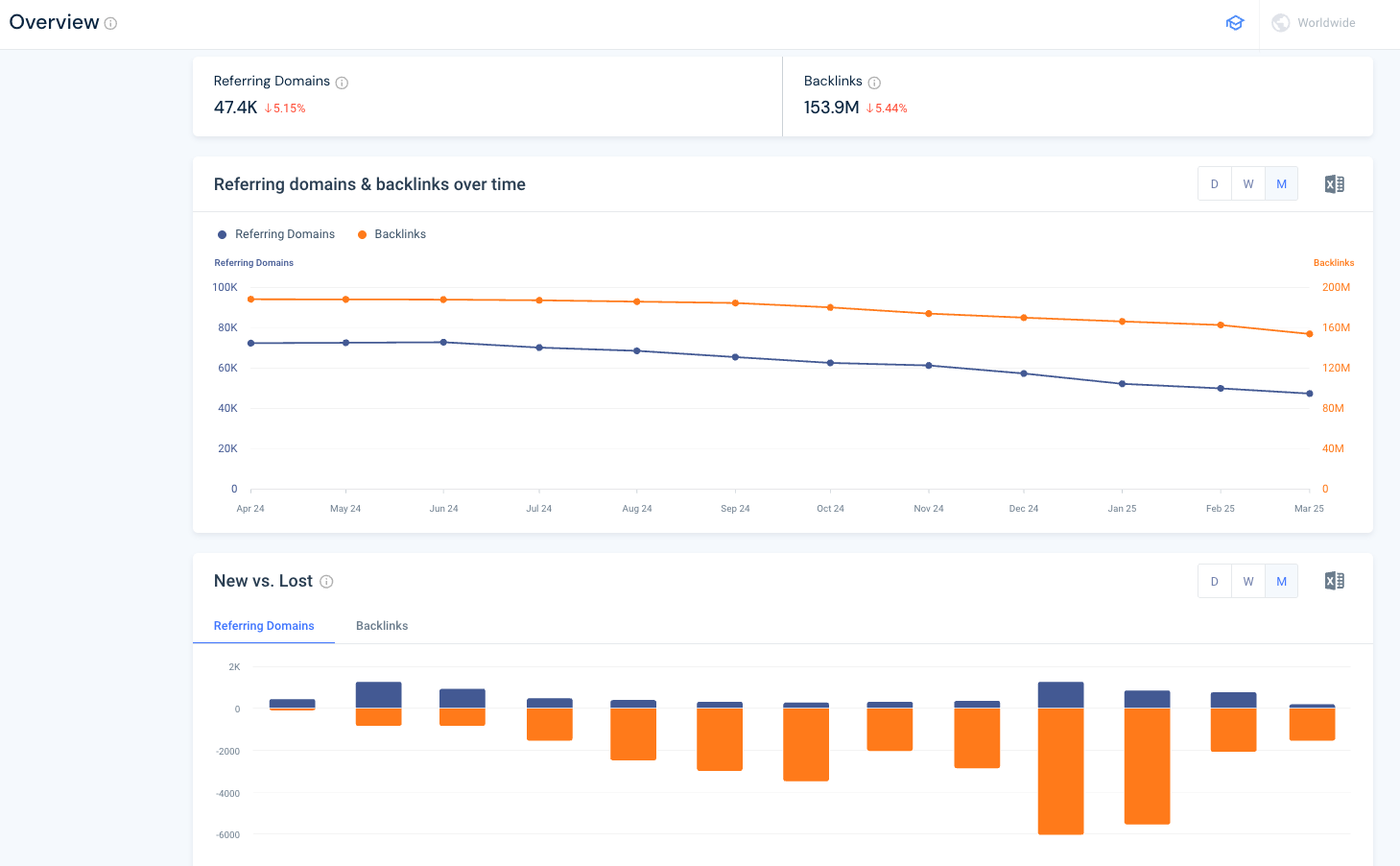
Understanding a website’s backlink profile is essential for strengthening off-page SEO and improving site authority. The Backlink Analytics tool offers insights into referring domains, inbound links, and competitor backlink strategies, allowing you to identify link-building opportunities that can help boost search rankings and overall visibility. You can monitor new, lost, and broken backlinks to maintain a healthy link profile.
- The Referring Domains report tracks which websites are linking to your or your competitor’s site, evaluates their quality, and gives you a breakdown of how many links are dofollow vs nofollow. SEO’s can use this data to identify valuable link-building opportunities. Comparing referring domains against competitors helps uncover new outreach targets for link acquisition.
- The Backlinks report provides a detailed view of individual inbound links, including anchor text, page trust score, and linking page authority. Understanding which backlinks drive the most traffic and SEO value helps you refine your off-page SEO strategy and strengthen your search visibility.
3. App Intelligence
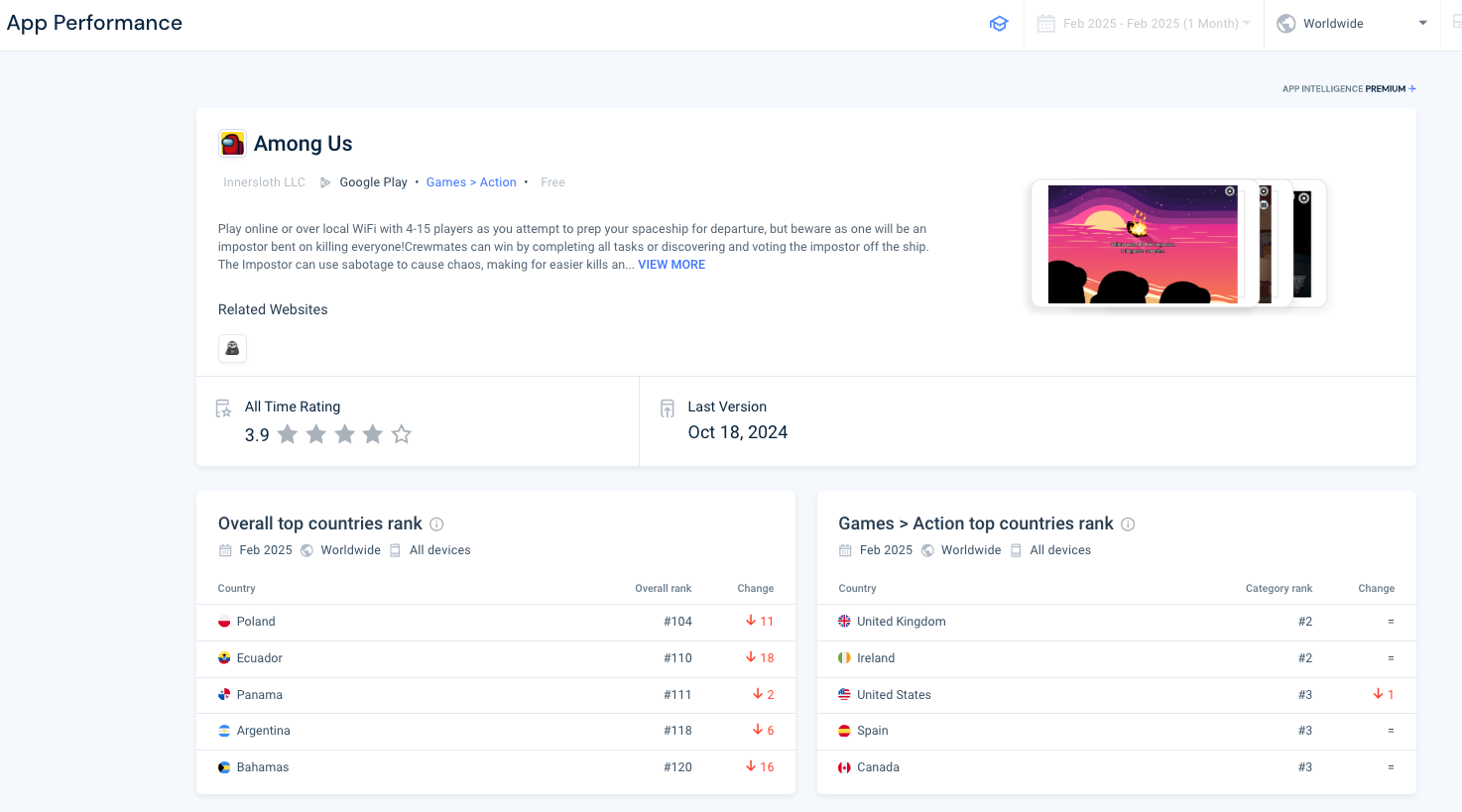
Similarweb’s App Intelligence provides you with comprehensive insights into mobile app performance, competitor benchmarking, and user behavior trends. By analyzing downloads, rankings, engagement, retention, and audience demographics, you can optimize your app marketing, user acquisition, and growth strategies.
a. Store Downloads
The Store Downloads feature tracks app install volumes over time.
b. Rankings
You can track how an app performs in app store rankings over time and also see the daily rankings. Filter by top free or top grossing, and view ranking trends for both.
c. Engagement & Usage
The Usage & Engagement report provides insights into how users interact with an app, measuring traffic metrics like monthly active users, daily active users, as well as engagement metrics like sessions per user, average session time, and more.
The tool allows you to see how your monthly active users, weekly active users, daily active users, and daily stickiness are progressing over time.
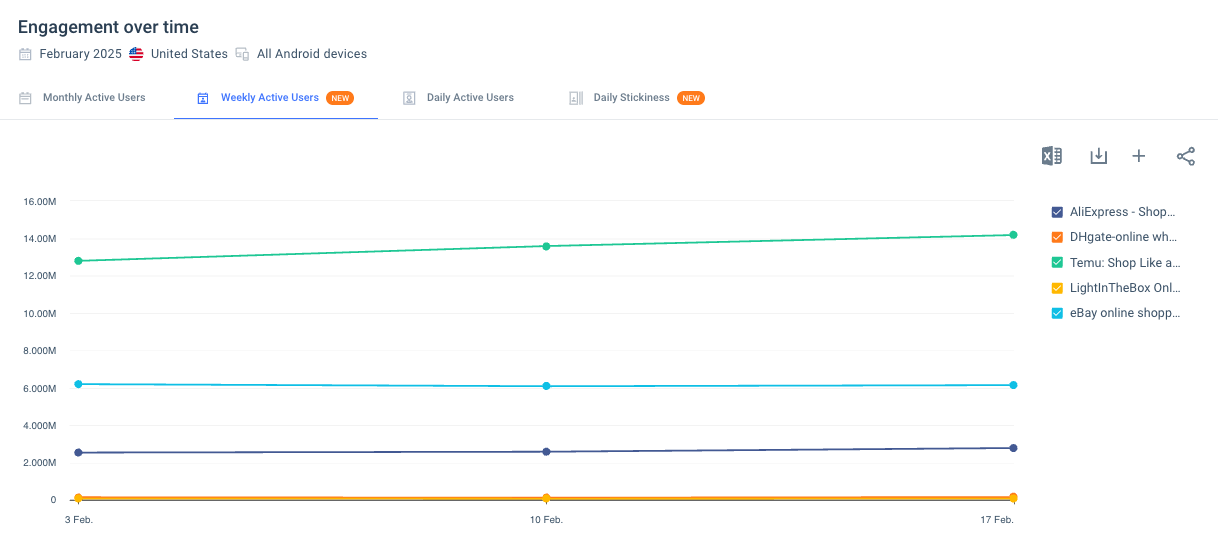
You can also see how user engagement is progressing by breaking down sessions per user, average session time, and total session time.
d. User Retention
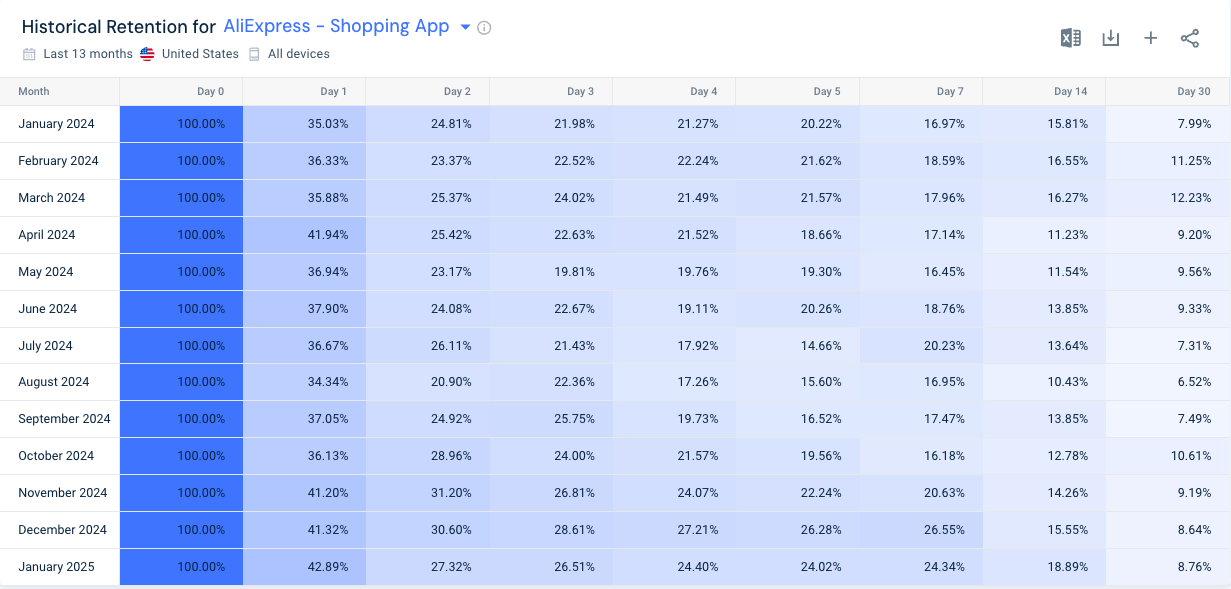
What happens after a user interacts with your app? The key to success with an app is user retention. To help you increase your retention, this report shows you average retention rates from when a user first interacts with your app, plotting retention over time.
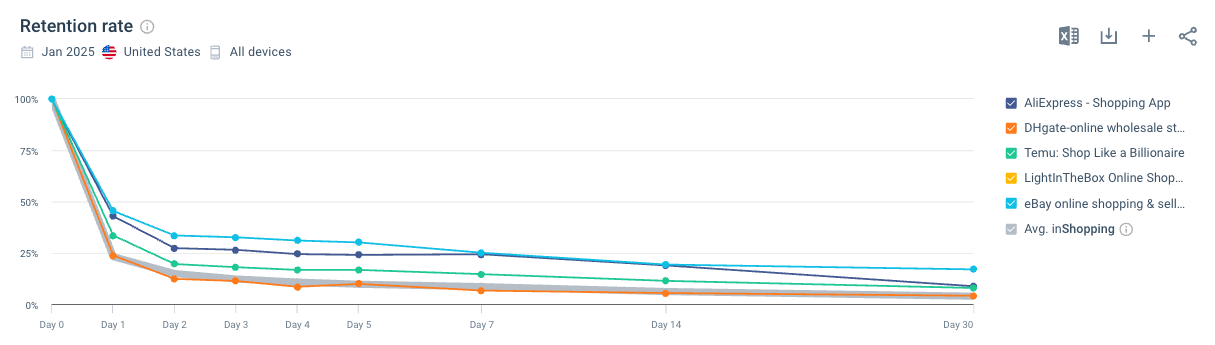
You can also monitor retention trends alongside app updates to see how specific changes impact user engagement.
e. Audience Insights
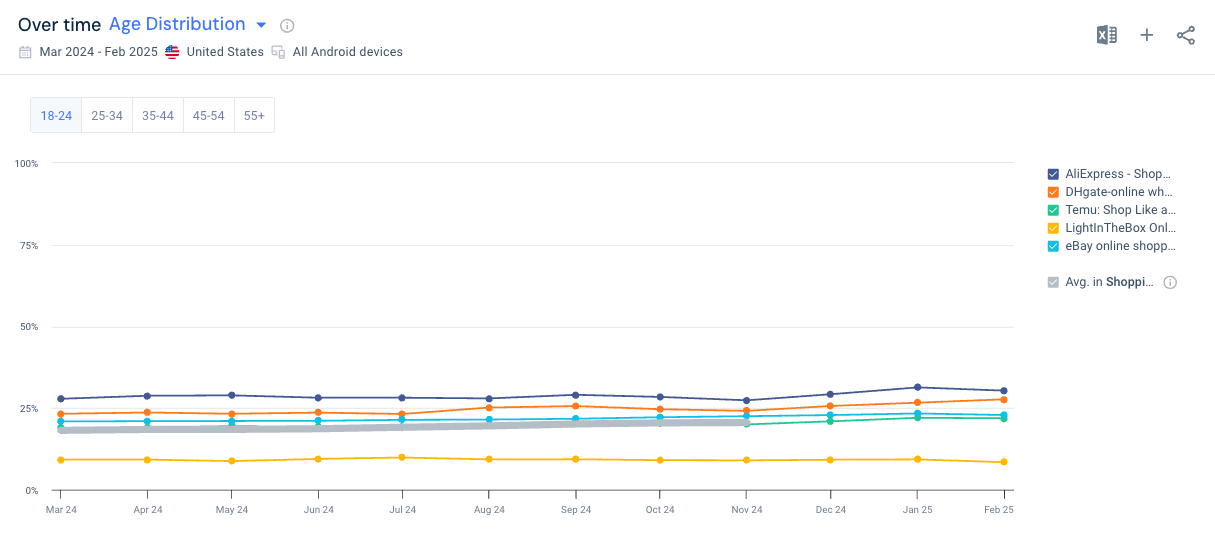
See demographic and behavioral data on app users, including gender distribution and age distribution.
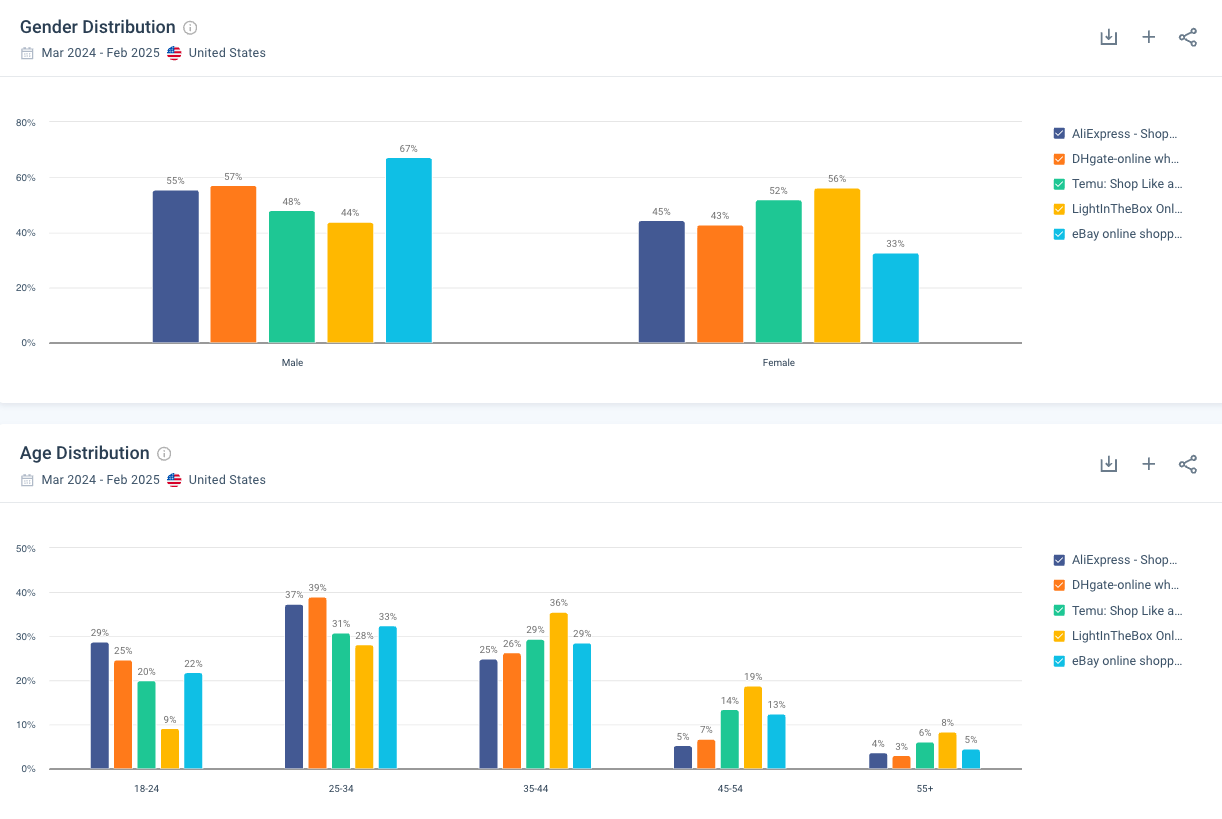
If you are making changes to your app over time, you can track how age distribution changes over time.
Who is Similarweb for?
Similarweb is for businesses, marketers, analysts, and developers who need deep insights into digital performance, market trends, and competitive landscapes. It serves SEO specialists, digital marketers, business analysts, ecommerce brands, and app developers, providing data-driven tools to optimize online visibility, track industry trends, and benchmark against competitors. Whether you’re looking to improve website traffic, enhance search rankings, analyze consumer behavior, or refine app strategies, Similarweb offers the intelligence needed to make informed decisions and drive growth.
Similarweb pricing plans
Similarweb offers a range of pricing plans designed to accommodate various business needs. The pricing plans are broken down into four tiers:
- Starter: The Starter plan begins at $199 per month or $1,500 per year and is designed for individual users such as marketers, researchers, and SEO/PPC professionals. It includes access for one user, three months of historical data, and the ability to view up to 1,000 keywords per table. While you get a global view of data, you cannot filter by specific countries. This plan is ideal for basic competitive tracking and performance benchmarking.
- Team: The Team plan starts at $14,000 per year and supports up to five users. It includes 15 months of historical data, up to 50,000 keywords per table, and the ability to filter data by one country. It also unlocks more advanced tools such as subdomain analysis, rank tracking, ad tracking, and full SERP analysis. This plan is suitable for marketing teams looking for deeper insights and ongoing competitive monitoring.
- Business: Starting at $35,000 per year, the Business plan includes everything in the Team plan, but adds expanded access to 25 months of historical data and up to 100,000 keywords per table. It supports up to five users and includes market research capabilities and API access, making it a strong fit for businesses that require in-depth market intelligence and custom integrations.
- Enterprise: The Enterprise plan offers custom pricing for organizations that need the most comprehensive data access. It includes support for up to 10 users, 37 months of historical data, unlimited keywords per table, and both global and country-specific filtering. In addition to all features from the Business plan, it also includes enterprise-level security and authentication options, making it ideal for large-scale operations with extensive data needs.
Digital Intelligence done right
Similarweb is a powerful digital intelligence platform that provides you with comprehensive insights into web, market, search, and app performance. Whether you’re an SEO professional, digital marketer, business analyst, or app developer, Similarweb’s suite of tools helps you analyze competitors, track industry trends, and optimize your digital strategies.
FAQ
What is Similarweb used for?
Similarweb is a digital intelligence platform that provides insights into website traffic, competitor analysis, market trends, SEO performance, and app analytics.
Does Similarweb have a free version?
Yes, Similarweb offers a free version with limited data, allowing users to access basic insights on website traffic and competitor performance.
How accurate is Similarweb’s data?
Similarweb’s data is estimated based on multiple sources, including public data, web crawlers, and partnerships. While not 100% precise, it provides valuable trend analysis and benchmarking.
What are Similarweb’s pricing plans?
Similarweb offers multiple pricing plans, including Starter, Team, Business, and Enterprise, with costs ranging from $125/month to custom enterprise pricing.